
Killzone C4d signature tutorial
Hi everyone, in this tutorial I’ll teach you guys to reach a similar outcome as the following Killzone signature:
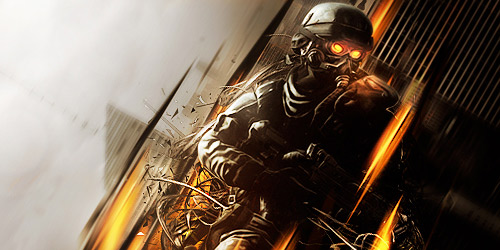
It’s not a difficult tutorial if you already know some basics and medium skills.


City stocks
In this post I have collected 48 city stocks. In these pictures you can find skylines, skyscrapers both in night as in day-light.
These stocks are great to use in the background of your signature, for example in combination with (wireframe) C4D renders.

80 female stocks
This is a collection of around 80 quality female stocks.
The collection is a combination of fashion, celebrity and hot girls. I have hand picked all the stocks myself to make sure you get the best quality available and don't have to search for some good female stocks!
These stocks are exclusive to premium members

25 Movie stocks
In this post I have collected 25 high quality movie stocks.
These stocks can be used in the background of your signature, but are also great to create an entire signature with.
The stocks are from movies like Batman, the Avengers and the Transfomers.
Game Renders november
In this months game renders release we have some amazing Assasins Creed renders.
Also other popular games like battlefield 3 and crysis make their appearance with some great game renders this month.

Game Renders october
War time!
In this month's release we have some great Gears of War, Guild Wars and God of War renders. Of course we also threw some other high quality game renders in the mix.

Game renders september
In this months release we have some great Halo renders by DMS AWP.
Next to this you can also check out some Mass Efect and Tekken renders. As always, all renders are free to download and high quality!

Make your website stand out with an eye-catching 3D design
A lot of modern forms of design seem to have some kind of 3D element in them, and a few simple touches can make any kind of website stand out for the end user. The free website builder of 1&1 (website.1and1.com) includes a number of features that allow the designer to introduce 3D elements - regardless of ability and experience.
In this post I will give you some tips on how to add 3D elements to your website

Drone psd pack
In this exclusive psd pack you will find 5 high quality signatures made by Drone.
The .psd files are fully labeled so you can see how they are made and learn some of the amazing technique's Drone uses in his signatures.
Bubble C4D Renders
This is a collection of over 60 high quality bubble C4D renders.
Bubble C4D renders are a great way to spice up your signature and are often used to give create special effects.